Launch updates, what we’re shipping next, and how thycc.fit stays one product across web and mobile.
October 10, 2026
Terms of Use rewritten — please review before you sign up
We rewrote the Terms of Use for thycc.fit.
Signup now asks you to accept them up front: what we collect, that laws governing data
collection apply, and that by creating an account you hold us harmless if there is ever a
data breach. The full Terms are linked only from the register page (required checkbox).
Please review it on the register page.
Sign out (if you’re already in), then click Create account and read the Terms
block before you check the box. Existing accounts already agreed at signup; new signups see the
updated copy.
Sign out from the account menu (or open a private window)
Read the Terms of Use section and open the full Terms from there
Only check “I accept” if you agree
We’ve added a fitness social network
thycc isn’t only a private diary anymore. There’s a
Feed where you can post status updates, share day cards from the
tracker, like and comment, set a profile photo, and add friends.
Tell your friends. Invite them to join, find each other with search, and work
together to keep each other going — encouragement around the same meals, burn, and goals.
Photo search: xAI looks at the plate, FatSecret finishes the log
Tonight we shipped something we’ve wanted since day one of the tracker:
point the phone at dinner and get searchable food names — without inventing a whole
nutrition database ourselves.
I’m at a bit of a loss for fancy product marketing here, other than:
it works. Hot dogs on the grill → Grok → “grilled hot dogs” → FatSecret hits with Add buttons.
That’s the whole pitch.
Photo in → xAI → FatSecret. Same phone-frame size as our other product shots.
What it does
On Add food, use Photo search (right side on desktop; above search on phone)
Pick a meal photo from your library (companions use the system photo picker so the app doesn’t reset)
Tap Describe & search
xAI (Grok) reviews the image server-side and returns a short food phrase plus a one-line description
We drop that phrase into the FatSecret search box and run the search automatically
You pick the serving and log it like any other food
Why xAI terminates the image review
FatSecret is great at branded and generic foods once you know what to type.
The hard part after a photo is turning pixels into a search string that isn’t nonsense.
That’s the job we give xAI’s vision API (currently grok-4.7 via
chat/completions with the image attached):
Look at the meal photo
Emit compact JSON: a FatSecret-friendly query (a few words) and a human description
Stop there — no calories invented by the model, no “trust the AI macros”
Nutrition still comes from FatSecret servings you confirm. Grok names; the database measures.
If the first match is wrong, edit the search box and search again — same as typing.
What leaves the phone
The photo is resized in the browser, sent to thycc over HTTPS, then to xAI for that one describe call
We don’t keep a meal-photo gallery on the server for this flow — it’s request → describe → search
Scoped to signed-in users (same API auth as the rest of the tracker)
Where to try it
Web tracker: app.php → Add food → Photo search.
Android Thycc Watch Site tab loads the same page (reinstall the latest debug APK if photo pick was flaky).
iPhone companion: rebuild with the camera/photo privacy strings so the WebView can open the library.
Grill something questionable. Send screenshots of glorious matches — or glorious misses — to
hello@thycc.fit.
Activity burn: MET × kilograms × hours — not pounds
Quick physics note for anyone staring at a burn number that feels roughly
2.2× too high.
On thycc you log body weight in pounds. The burn formula still needs
kilograms:
kcal ≈ MET × weightkg × hours
A common slip that lands almost exactly on 497–498 is plugging those
pounds straight into the kilogram formula — no conversion. For example:
Wrong: 166 lb × 1.0 MET × 3 hours = 498 kcal
Right: about 166 / 2.2 ≈ 75 kg, so
75 × 1.0 × 3 = 225 kcal
Same person, same MET, same time — almost a 2.2× swing — because pounds got treated like kilograms.
Thycc does the conversion for you before the math
(lb × 0.45359237 → kg), then multiplies MET × kg × hours for manual activity and watch sync.
If a spreadsheet or another calculator shows ~498 for a ~166 lb person at 1 MET for 3 hours,
that tool skipped the lb→kg step.
Walkthrough: getting your devices to talk to Thycc FIT
Mid-afternoon update: we recorded a walkthrough on getting your phone and watch to talk to
Thycc FIT — sign-in, tokens, pull, and phone home. Watch it on the page below
(or on
YouTube).
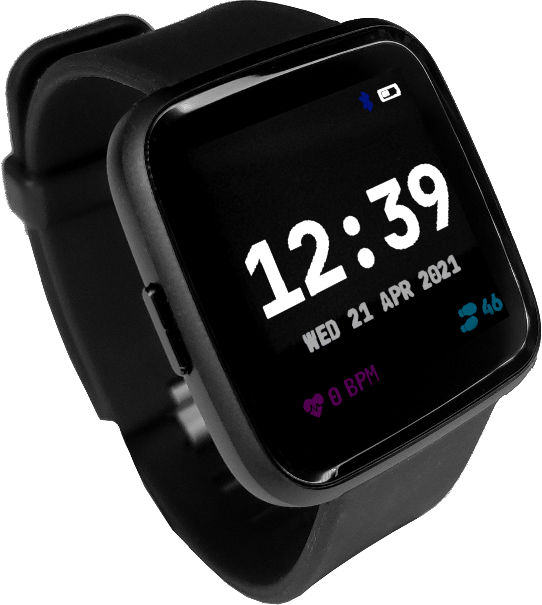
Please try a PineTime — the Thycc FIT Watch — if you can.
It’s open source hardware running open InfiniTime firmware, and we integrate
into that stack closely on both Android and iPhone. That path avoids most of the friction you’ll
hit with third-party watches, Gadgetbridge setup, Intent/DB exports, HealthKit permission mazes,
and “my brand doesn’t export clean steps today” dead ends.
Why we push PineTime so hard
Open source end to end — PineTime hardware + InfiniTime software.
We can see the BLE surface and keep Thycc Watch aimed at it.
First-party BLE in our apps — scan, pull steps / active time / heart rate,
phone home. No sideloading a second watch app just to get today’s activity out.
Same diary contract — scoped Watch tokens and watch_sync,
identical on Android and iPhone.
Fewer obstacles — other paths work (Gadgetbridge on Android, HealthKit on iPhone),
but they add apps, permissions, exports, and model-by-model quirks. PineTime is the short road.
If you already own another watch
We’re not slamming the door. Android can still lean on
Gadgetbridge + the beta APK; iPhone can use
Apple Health. Those exist so you aren’t blocked.
But if you’re shopping, testing with us, or tired of the gauntlet in the video —
buy or borrow a PineTime and use it as the Thycc FIT Watch.
Order through us ($69, under testing) or grab one yourself from
ameriDroid
— details in the evening post.
What to do after the video
Sign in on thycc.fit (Site tab in the companion)
Prefer PineTime / InfiniTime on the Watch tab when you have one
Pull today’s sample → Phone home
Stuck? Email
hello@thycc.fit
with phone / watch / OS and where it broke — screenshots help
iPhone update: Apple Health (HealthKit) syncs into thycc
Shipped today on the iPhone Thycc Watch companion: close integration with
Apple Health (HealthKit). Apple Watch — and anything else that writes activity into Health —
can update your thycc diary the same way a PineTime sync does.
Last night’s evening poll asked whether we should do this.
We treated “yes” as the default product direction and wired it in.
What you can do now
Open the iPhone app → Site tab → sign in to thycc.fit (scoped Watch tokens create themselves)
Switch to the Watch tab → Connect Health → allow the read types iOS prompts for
Pull from Health for today’s sample → Phone home to thycc.fit
Optional: turn on Auto-update and prefer Apple Health so we refresh while the app is open
What HealthKit reads
Steps for the diary day
Exercise time (Apple’s exercise minutes) as active minutes — workouts fill in if exercise time is empty; otherwise we fall back to steps÷100 like PineTime
Average heart rate for the day when Health has samples
Active energy is kept in the sync payload for debugging — thycc still estimates walking burn from active minutes the same way as other watch sources
Day boundary matches the server diary date (America/New_York), so Health “today” lines up with your tracker day.
We still do not collect GPS or location.
What stays the same
PineTime / InfiniTime BLE on iPhone is unchanged — scan, pull, phone home
Same watch_sync API and scoped Watch tokens as Android
Gadgetbridge multi-watch path remains Android-only (that’s where GB lives)
No sleep, SpO₂, stress, or full history dumps — day activity fields only
How to get the iPhone build
The HealthKit work is in the open Xcode project under
worker/iphone (entitlements + Health privacy strings included).
Build with Xcode 15+ on a Mac, set your Signing Team (HealthKit capability required), and run on a
physical iPhone — the simulator won’t give you a real Apple Watch / Health feed.
If you already beta the Android APK, this is the iOS counterpart for Apple’s ecosystem:
Health for Apple Watch and friends; BLE for the Thycc FIT Watch.
Tell us what you see
Email
hello@thycc.fit
with phone / watch / iOS version, whether Connect Health / Pull / Phone home worked, and screenshots if something looks off.
Recommendations welcome.
Beta download: Thycc Watch on Android — more watches welcome
Follow-up to tonight’s evening post: we decided to accept
additional watches into the thycc pipeline on Android — not only the
PineTime / Thycc FIT Watch path we already described.
Please read this entire post if you’re going to beta test.
Sideloading, F-Droid / Gadgetbridge, what the app does and does not do, install warnings,
and how to report issues are all below — don’t skip ahead to the download.
This is beta. It is not on the Play Store yet. After you download and try to open the APK,
Android will show a warning / “blocked” style dropdown about installing apps from outside the Play Store
(and may ask you to allow installs from the browser or Files).
That warning is normal for sideloaded betas.
Thycc Watch is not malicious — we promise you that.
It’s our companion, talking only to thycc.fit over HTTPS with scoped Watch tokens.
Allow the install only if you trust this site and want to help test.
What the app does
Loads thycc.fit in a Site tab (same tracker you use in a browser)
After you sign in, creates scoped Watch tokens (short-lived, install-bound — not your password)
PineTime / Thycc FIT Watch (InfiniTime) — scan and pull steps / active time / heart rate over built-in BLE
Other watches via Gadgetbridge — ask GB to sync, import today’s activity export, then phone home
Phone home — sends that day’s activity sample to thycc
(steps, active minutes, average heart rate if available, estimated burn, device name)
Optional auto-update (off by default) to refresh activity while the app can run
Simulate sample — for UI testing without hardware
What the app does not do
Does not collect GPS or your location
Does not replace Gadgetbridge — GB still pairs and talks to most third-party watches
Does not flash firmware, update InfiniTime, or manage watch faces / notifications for every brand
Does not sync sleep stages, SpO₂, stress, PAI, workouts GPX, or full history — only the day activity fields above
Does not bring Gadgetbridge’s multi-watch Intent/DB path to iPhone — iOS uses Apple Health + PineTime BLE instead
Does not guarantee every GB-listed gadget exports clean step/HR data into thycc — support quality varies by watch
Is not a Play Store–verified app yet (hence the install warning)
Supported watches
Built-in (no Gadgetbridge required):PineTime — the Thycc FIT Watch — running InfiniTime.
Via Gadgetbridge (Android): any wearable GB can pair and export activity for.
Gadgetbridge documents on the order of hundreds of watch / band models across dozens of vendors
(full catalog:
gadgetbridge.org/gadgets/wearables).
Feature depth differs by device; Thycc only needs a usable activity export for today.
Wearable families currently covered on the Gadgetbridge watches list include:
Pine64 — PineTime (also our first-party BLE path)
Xiaomi — Mi Band / Redmi Watch / Xiaomi Watch lines (~40 documented)
Amazfit / Zepp — Bip, GTR, GTS, T-Rex, Band, Active, Balance, and more (~58)
Garmin — Fenix, Forerunner, Venu, Instinct, Epix, Enduro, Edge, Descent, and many others (~155)
Huawei / Honor — Band, Watch GT / Fit / Ultimate, MagicWatch, and more (~63)
Pebble — classic Pebble family (~8)
Bangle.js — Bangle.js / Bangle.js 2
Casio — G-Shock / Bluetooth Casio models (~11)
Fossil — Hybrid HR / fashion hybrids (~5)
Sony — select wearables (~3 in the watches category; GB also lists headphones separately)
Polar — e.g. H9 / H10 style sensors (~2)
Withings — Steel HR
Nothing / CMF — CMF Watch Pro line (~3 watches in category)
FitPro / FitCloud / GloryFit / Moyoung (Da Fit) / Wearfit / Laxasfit / Keep Health — large set of white-label bands
HPlus, Haylou, Hama, Lenovo, MyKronoz, Zeblaze, SMA, Soundbrenner, AsteroidOS, Wasp-os, UNA Watch, Ollee Watch One, Nx Wear, and other / unbranded models
If your watch pairs in Gadgetbridge and can export today’s steps (and ideally HR), it’s a candidate for thycc.
Check your exact model on
gadgetbridge.org/gadgets
before you buy a watch just for this beta.
Gadgetbridge is on F-Droid
Gadgetbridge isn’t a typical Play Store download. It lives on another app store called
F-Droid — no pun intended — and the GB package is available through them:
f-droid.org/packages/…/gadgetbridge.
F-Droid is a long-running, open catalog for free and open-source Android apps; they’re a
respectable agency in that space, which is why GB (and a lot of privacy-minded software) ships there.
This path needs intermediate phone knowledge: sideloading our Thycc APK, installing
F-Droid (or the GB APK from that listing),
enabling Intent API under GB developer options, syncing, exporting, and importing the file in Thycc.
If you only want a one-tap retail app, wait — we’re not there yet.
If you have questions about our methods — how tokens work, what leaves the phone, why F-Droid / GB —
feel free to drop us a line. The email is just about at the bottom of this post.
iPhone / HealthKit
HealthKit is in the iPhone Thycc Watch app — connect Apple Health, pull today’s
steps / exercise time / heart rate (including Apple Watch), and phone home over the same
watch_sync path. PineTime BLE remains available on iOS; Gadgetbridge stays Android-only.
We need your help testing
We don’t have a demo watch on the bench yet — we’re still waiting for our PineTime.
So real-world reports from you matter a lot.
Please email
hello@thycc.fit
with your findings: what worked, any errors, which watch / phone / Android version, and
screenshots when something looks wrong.
Same address for questions about our methods.
Recommendations welcome — anything constructive other than “take it down.” :)
Quick start
Create / sign in to thycc.fit
Download the APK — accept Android’s sideload warning if you trust us
Open Thycc Watch → Site tab → log in
Watch tab → PineTime BLE or Open Gadgetbridge → Ask GB to sync → Import GB export → Phone home
Mail hello@thycc.fit if it breaks (or if it works — that helps too)
Evening post: Thycc FIT Watch, InfiniTime, and what’s under testing
Long day. This evening note wraps the research and shipping we did around the wearable path —
what the hardware is, what the software is, how it talks to thycc, pricing if you want one through us,
and how to buy the same watch yourself while everything is still in testing.
Two polls sit at the end — and we’ve already shipped a
beta Android build that leans into additional watches via Gadgetbridge.
PineTime is the Thycc FIT Watch
The wearable we’re building around is a PineTime. That’s the
Thycc FIT Watch — open hardware you wear on your wrist.
Heart rate, steps, active time, and burn can flow into your diary through the
Thycc Watch phone companion (Android and iPhone).
InfiniTime is the software underneath
InfiniTime is the open firmware / software wrapper running on the PineTime.
It’s what actually talks Bluetooth Low Energy to the phone and exposes the activity signals
thycc reads. So: PineTime = Thycc FIT Watch (hardware);
InfiniTime = the software that communicates with the system.
What we changed and learned today
Built-in BLE on both phone apps aimed at PineTime + InfiniTime — scan, pull steps / HR,
phone home with scoped Watch tokens (not your password).
Auto-update watch data stays off by default; when on, it refreshes activity only —
no GPS, no location.
Watch sync lands in the tracker day totals (steps, active minutes, heart rate, burn).
We researched Gadgetbridge:
strong on Android, not an iPhone path — so we own the BLE client ourselves on both platforms.
On iPhone, Apple Watch still owns most of the market; the app now reads Apple Health (HealthKit)
for day steps / exercise / HR — separate from InfiniTime BLE on the Thycc FIT Watch.
Homepage and register copy call out the testing-phase companion and what data leaves the phone.
Price: $69 through us — still under testing
We’re listing the Thycc FIT Watch at $69.
The watch’s shipped MSRP is about $55; we order from a supplier and have it
delivered to you, so the hike covers sourcing, handling, and helps fund thycc alongside the ads
on the site — click them if you want to support the build.
They are still under testing. Companion apps, sync, and fulfillment are not a polished
retail product yet. Order through us only if you’re comfortable being an early tester.
Thycc FIT Watch — PineTime hardware, InfiniTime software. $69 through us · under testing.
Or order a PineTime yourself from ameriDroid
You don’t have to buy through thycc. You can order a PineTime
(the same hardware as the Thycc FIT Watch) yourself from
ameriDroid,
flash / use InfiniTime, and pair it with the Thycc Watch apps when you’re ready.
Same stack — you handle the purchase and shipping.
Poll 1 — more Android watches via Gadgetbridge?
Gadgetbridge
already speaks to a long list of Android wearables. Should Thycc lean on it to support
additional watches beyond PineTime / InfiniTime?
On Android, should Thycc support additional watches by integrating with Gadgetbridge?
1 vote so far
Poll 2 — HealthKit on iPhone?
Should the iPhone app closely integrate with Apple Health (HealthKit)
so Apple Watch and other Health data can update your thycc diary the same way a PineTime sync does?
On iPhone, should Thycc closely integrate with Apple Health (HealthKit) so Apple Watch and Health data update your diary?
1 vote so far
What to try tonight
Read the homepage Watch section for the testing-phase companion shots
If you already have a PineTime, try the Android / iPhone Watch tab when you have a build
Click an ad if you want to toss a little support our way
Day three: verify email, evening reminders, and quieter ops
Day two shipped the phone layout, imports, Grok, sodium, share cards, and the Thycc FIT Watch idea.
Late yesterday and today we tightened how accounts join the site and how we help you stay consistent —
plus a few operator tools that didn’t make the earlier post.
Email verification on signup
New accounts don’t unlock the tracker until you confirm your email.
After register, we send a link from hello@thycc.fit;
open it within 48 hours (you can resend from the confirm page if needed).
Existing accounts were left verified so nobody got locked out.
First-time mail often lands in spam or junk — check there if you don’t see it,
and whitelist hello@thycc.fit so verification and later messages reach your inbox.
Most providers learn from our mail servers authenticating email for legitimacy,
so delivery usually improves after that first message is recognized.
The register page calls the whitelist tip out up front.
Evening reminder if you haven’t logged
If the day is winding down and you still haven’t posted any food, thycc can email a short nudge
with a link back to the tracker. It runs once per evening, only for verified accounts,
and only when today’s diary is still empty.
The Grok section on the blog now shows a real chat screenshot — tap it for the full lightbox view
(same pattern as the homepage showcase).
Admins can impersonate a user from All users to verify posting problems —
see their tracker and diary exactly as they do when something doesn’t look right,
with a clear banner and a one-click return to admin.
Account changes and API keys stay blocked while impersonating.
All users also shows how many people are on the site right now (last 15 minutes), plus how many are signed in —
handy when we’re watching a launch day.
What to try
Create an account and confirm the email (whitelist hello@thycc.fit)
Log something today so the evening reminder stays quiet — or leave the diary empty once to see the nudge
Toggle Email reminders under Account if you’d rather not get them
Tap the Grok screenshot in yesterday’s post for the full chat view
Day two: phones, imports, Grok, sodium, share — and a watch idea
Day one got thycc.fit on the web. Day two is about using it everywhere you already are —
on a phone, from another tracker’s export, from a chat with Grok —
watching sodium, sharing a day card, and kicking around a wearable so more metrics could land without typing them in.
Built for the phone
The tracker and metrics pages now lay out cleanly on iPhone and Android widths.
The menu (Today / Metrics / account links) lives behind a hamburger on small screens;
date controls stay easy to hit; charts and tables stay inside the viewport instead of forcing sideways scroll of the whole page.
Import, account, and admin screens share the same top bar so navigation feels consistent once you’re logged in.
Bring a diary from somewhere else
Switching apps shouldn’t mean starting from zero.
The import page accepts exports from MyFitnessPal, Lose It!, Cronometer, FatSecret, or a generic CSV —
foods and weigh-ins land in your thycc diary with source-specific how-to steps on the page.
Talk to thycc from Grok
You can create a personal API key under Account and connect Grok to
https://thycc.fit/mcp with a Bearer token.
From chat, Grok can search FatSecret, log food and activity, save a weigh-in, read today’s diary, and pull metrics trends —
without opening the tracker UI.
Grok + ThyccGrok pulling today’s intake from thycc and weighing in on sodium before dinner. Tap for full view.
Keys are hashed at rest, shown once when you create them, and revocable anytime.
The homepage showcase also includes a Grok screenshot alongside the food-logging shots (tap any shot for a larger view).
Sodium monitoring
The tracker now rolls up sodium in milligrams alongside protein, carbs, sugar, and fat.
FatSecret servings and diary imports carry sodium through; the day ring shows progress against a
2,300 mg daily limit and flips to a warning when you’re over.
Metrics adds a sodium chart, average, and daily table column.
Existing FatSecret diary rows were backfilled from their original servings.
Share your day
Between the food diary and day total there’s a share strip:
Facebook, LinkedIn, X, Threads, WhatsApp, Telegram, Reddit, email, download, and system share where the phone supports it.
Each tap builds a branded day card (intake, burn, net, vs goal, macros, sodium), hosts a preview page with the image,
and opens the network so friends see the graphic — not just a bare link.
Kicking around the Thycc FIT Watch
We’re also kicking around the idea of releasing a Thycc FIT Watch for $69
— a PineTime running InfiniTime —
so heart rate, steps, and activity could update autonomously through your phone and the watch —
signals flowing into thycc without a manual log every time. Nothing for sale yet; review is underway.
See tonight’s evening post for pricing, testing status, and ameriDroid.
Thycc FIT Watch (PineTime + InfiniTime) — targeted at $69. Under testing.
The concept includes a heart rate monitor, a week-long battery, and a capacitive touch display that’s legible in direct sunlight,
paired with the phone you already use — iPhone or Android — so burn and recovery data could sit next to the food diary you log on thycc.fit.
If we ship it, the interesting part is the bridge: watch → phone → thycc metrics,
so your day on the wrist lines up with the diary on the site.
What to try
Open the tracker on your phone and use the menu for Metrics or account
Import a diary export if you’re switching from another app
Create an API key and add the Thycc connector in Grok
Ask Grok something like “check my trends” or “log oatmeal for breakfast”
Watch sodium against the daily limit on the ring and in Metrics
Share a day card to Facebook, LinkedIn, X, or download the PNG
Today we flipped the switch on thycc.fit — Thy Calorie Counter.
It’s a free web tracker for logging meals from FatSecret, estimating activity burn with Compendium MET values,
watching weight against a goal, and reading the day’s deficit on one screen.
Day one includes the food diary, activity burn, goal weight pacing, a metrics page with line charts,
private accounts, and the landing experience you’re reading from. We’re building in public from here —
expect more posts as features land.
iPhone and Android apps are coming soon
Native store listings for iPhone and Android are on the roadmap. Important detail:
those apps will not be rewritten as in-phone (native UI) programs.
They’ll ship as a thin shell that loads thycc.fit in a WebView —
the same website you use in Safari or Chrome, packaged for home-screen install and App Store / Play Store distribution.
That keeps one codebase, one design, and one set of features. When the web tracker improves,
the apps improve with it. No separate mobile rewrite to drift out of sync.
What you can do today
Create a free account and open the tracker in your browser
Log foods, activity, and weigh-ins; set calorie and weight goals
Check Metrics for intake, burn, macros, and weight over time